


A few days ago I received an email containing an attachment of a commercial expert advisor. Ea was named CaspianEA CHF. The sender suggests that the EA is very similar to VS_EuroCross. After watching the entire of Caspian code, then obviously it is a copy of VS_EuroCross.
I must admit it seller is smart to hide his cunning. Unlike the Pip Turbo EA, CaspianEA do some things to hide that EA is just an imitation.
Changing DLL File Name
The first thing done by CaspianEA to deceive buyers is to replace Volatily Dll file be CaspianEA.CHF name. This is not a difficult thing to change the name because I also recommend if you want to run vs_eurocross on several pairs in a terminal. But look at the function used, it is clear that the version used is version before d05. But fortunately they can not change the name of the function names are used. So they actually just change the file name. And so far, although I've sold some vs_eurocross source, but for the DLL source code itself, I never give it to someone.
Changing Volatily Period Variable with Caspian Factor
This is just a trick. In principle, this variable is the period of the Moving Average, Standard Deviation and Average True Range Indicator. CaspianEA using a smaller value such as 3. However, in the code, this value will be multiplied by 10. So to use volatily period = 20, then the value Caspian Factor must use 2.
Putting indicators that are not used in any trading decisions
This is exactly the trick that fooled many traders, especially for those who do not understand the MQL language. EA sellers will say they add some indicators. But in fact, their EA does not use these indicators in any trading decisions.
Get Back Your Money

Showing posts with label VS_EUROCROSS. Show all posts
Showing posts with label VS_EUROCROSS. Show all posts
Thursday, October 8, 2009


Sunday, August 9, 2009
VS_EuroCross_D05 Update
I have fixed the wrong statement as my previous post. Now you can update your VS_EuroCross_D05. However it's not including the new FFCAL indicator.
I also expect if your are newbies to Meta Trader platform, then find guidance from other site. Although in the next future i will post about MQL4 programming and EA installation guide. And if you are newbies to use my Expert Advisor, then please read my old post if you don't find any answer in the manual.
My Recent Activities
At the moment I still build the VS_EuroCross without using ActiveX. May be is sound weird, but its true. Since publishing my VS_EuroCross with using ActiveX, I never update it original source, and all my demo test also using what you download from my 4shared folder.
Preparing for Market Change
On my own observation, every year during August to December, the volatility will increase, and often market in trending way. Refer to last year performance, during this period is a heaven for any scalper EA that work in Asian Session. Will be repeated? No one can answer it. However during high volatility my EA will trade often. Thus if this happen reduce your risk, and expect bigger profit from more pips that EA earn instead of increasing your trade size.

I also expect if your are newbies to Meta Trader platform, then find guidance from other site. Although in the next future i will post about MQL4 programming and EA installation guide. And if you are newbies to use my Expert Advisor, then please read my old post if you don't find any answer in the manual.
My Recent Activities
At the moment I still build the VS_EuroCross without using ActiveX. May be is sound weird, but its true. Since publishing my VS_EuroCross with using ActiveX, I never update it original source, and all my demo test also using what you download from my 4shared folder.
Preparing for Market Change
On my own observation, every year during August to December, the volatility will increase, and often market in trending way. Refer to last year performance, during this period is a heaven for any scalper EA that work in Asian Session. Will be repeated? No one can answer it. However during high volatility my EA will trade often. Thus if this happen reduce your risk, and expect bigger profit from more pips that EA earn instead of increasing your trade size.
Friday, August 7, 2009
Difference formula for buy and sell signal
There is a single line in my VS_EuroCross_D05 that should be corrected. I forget to link it with the external variable. It make your optimization will not work on long position. However in the short position it work well, as well if your broker offer 3 fixed spread and you use default setting.
It is located on the line 419 setFilter2(currange,3,1,0,0), all these parameter should be linked in the external variable. It is over optimization. Because the entry formula for long position is different with short position. To fix it, just go to the line 398, or find this statement setFilter2(currange,MinRange,MinProfit,UseRange,UseTradeRange) then replace it. This is the correct one. For a system, the Sell signal and Buy signal should be symmetrical.
Sponsor link:
MSI U123 10.2” XP Home 3-Cell Netbook (Blue or Red) $319 Free Shipping
Reduce Your Spread at Many Forex Broker
It is located on the line 419 setFilter2(currange,3,1,0,0), all these parameter should be linked in the external variable. It is over optimization. Because the entry formula for long position is different with short position. To fix it, just go to the line 398, or find this statement setFilter2(currange,MinRange,MinProfit,UseRange,UseTradeRange) then replace it. This is the correct one. For a system, the Sell signal and Buy signal should be symmetrical.
Sponsor link:
MSI U123 10.2” XP Home 3-Cell Netbook (Blue or Red) $319 Free Shipping
Reduce Your Spread at Many Forex Broker
Thursday, August 6, 2009
VS_EuroCross_D05 Will Become The Last Version
Although the VS_EuroCross_D05 is the last version of VS_EuroCross, but still it has some problems that I can't fix it.
The Trading Time
Unfortunately until now the trading time problem in VS_EuroCross_D05 is not fixed yet. This problem is regarding to the rule no trade in the first 2 hours at weekly opening. In simple world no trade before Monday 0 GMT+0 every weekly opening. Thus if you can't match this rule with your broker, then it is better just avoid trading during this time.
Running more then one VS_EuroCross_d05 in a platform
According to Mq4 reference, that all Dynamic Link Library file is shared to all EA in the platform. Unfortunately this is make VS_EuroCross unstable if your run it on several chart at once. However you can do little trick if you keep going to run it on several charts at your MetaTrader Platform. If you already copy the volatily.dll in your library folder, then simply copy again that file and give it difference name, such as volatily1.dll; Next you need to change the import statement in the mq4 source file. Just find this statement #impor volatily.dll and rename the volatily.dll with volatily1.dll; You can do this step as much as you want. However you have to be wise regarding the performance. You should only do this thing in your demo account.
The FFCal Indicator
Regarding the FFCal version which is included in my package file,please visit fx-knight.com to get the latest version.
Because of scalping is a high cost game, you may need to find such rebate program to minimize your cost. However you may not always get rebate by the Term of Service or Term of Condition from the broker. But the end it would be better to try it.
Sponsor link:
MSI U123 10.2” XP Home 3-Cell Netbook (Blue or Red) $319 Free Shipping

Reduce Your Spread at Many Forex Broker
The Trading Time
Unfortunately until now the trading time problem in VS_EuroCross_D05 is not fixed yet. This problem is regarding to the rule no trade in the first 2 hours at weekly opening. In simple world no trade before Monday 0 GMT+0 every weekly opening. Thus if you can't match this rule with your broker, then it is better just avoid trading during this time.
Running more then one VS_EuroCross_d05 in a platform
According to Mq4 reference, that all Dynamic Link Library file is shared to all EA in the platform. Unfortunately this is make VS_EuroCross unstable if your run it on several chart at once. However you can do little trick if you keep going to run it on several charts at your MetaTrader Platform. If you already copy the volatily.dll in your library folder, then simply copy again that file and give it difference name, such as volatily1.dll; Next you need to change the import statement in the mq4 source file. Just find this statement #impor volatily.dll and rename the volatily.dll with volatily1.dll; You can do this step as much as you want. However you have to be wise regarding the performance. You should only do this thing in your demo account.
The FFCal Indicator
Regarding the FFCal version which is included in my package file,please visit fx-knight.com to get the latest version.
Because of scalping is a high cost game, you may need to find such rebate program to minimize your cost. However you may not always get rebate by the Term of Service or Term of Condition from the broker. But the end it would be better to try it.
Sponsor link:
MSI U123 10.2” XP Home 3-Cell Netbook (Blue or Red) $319 Free Shipping
Reduce Your Spread at Many Forex Broker
Entry Setup
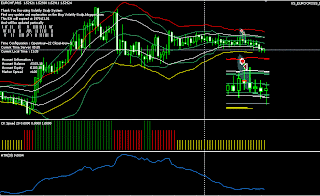
I grab the picture today that showing how VS_EuroCross_D05 trigger the trade with new entry rule (UseTradeRange=true). As common rule in my Volatily Scalp EA that to trigger entry the distance between price and MA must be equal or more then signal filter. The signal filter itself is comparable the maximum between double spread and current 20 Average True Range. Applying this rule will guarantee if price hit the MA at the same bar when it triggered, we will make profit as much as current spread or even more, in case the current ATR is bigger then double spread.
Back to new entry rule, it is now calculate the current range. If the current range is bigger then Signal Filter, the entry will be triggered if the distance between price and MA is equal or bigger then spread + 1 pip. But still it must penetrate upper/lower Keltner Channel. Mostly during low volatility, if the price penetrate upper/lower channel while current range is bigger then double 20 Period ATR, price will back to Moving Average.
UseTradeRange Signal
Acer Aspire One Ultra Thin AOD250-1116 10.1” Atom 1.6GHz XP Home Red Netbook $271.99 Free Shipping

Back to new entry rule, it is now calculate the current range. If the current range is bigger then Signal Filter, the entry will be triggered if the distance between price and MA is equal or bigger then spread + 1 pip. But still it must penetrate upper/lower Keltner Channel. Mostly during low volatility, if the price penetrate upper/lower channel while current range is bigger then double 20 Period ATR, price will back to Moving Average.

Acer Aspire One Ultra Thin AOD250-1116 10.1” Atom 1.6GHz XP Home Red Netbook $271.99 Free Shipping
Wednesday, August 5, 2009
Variable Optimization
What make me enjoy with VS_EuroCross_D05 that it is more profitable with any previous version just using single trade per position. If you would like to optimize this VS_EuroCross_D05, try to optimize the MinRange and MinProfit variable. In this case you should set the SpreadFilter to false. You can apply UseTradeRange and UseRange after finding suitable result, other way you can directly to optimize those variables.
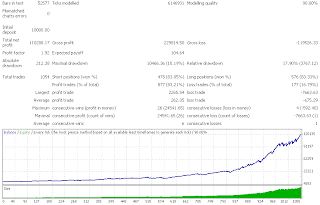
I made 2 back test before releasing VS_EuroCross_D05. The first back test just to set UseTradeRange Variable with True, and the second I set the MinProfit with 2.

UseTradeRange True
MinTarget True
I made 2 back test before releasing VS_EuroCross_D05. The first back test just to set UseTradeRange Variable with True, and the second I set the MinProfit with 2.


Tuesday, August 4, 2009
FFCAL Indicator Setup
Since VS_EuroCross_D05 come with FFCAL Indicator, I add some external variables to use FFCAL Indicator. In VS_EuroCross_D05, the use of FFCAL indicator is integrated in the trading time function. As the news filter, the main thing that you have to do is deciding minutes for news before and after.
Below the list of external variable that you have to set to use FFCAL indicator. However please remember that VS_EuroCross_D05 comes with 2 MQ4 files, VS_EuroCross_D05.Mq4 and VS_EuroCross_D05_NonFFCal.Mq4.
extern bool NewsFilter =false;
It is the first thing that you have to change. Set its value to True to use FFCAL indicator.
extern int MinBeforeNewsCloseAction=15;
Set the minutes before news for closing all open positions. Default value is 15 minutes.
extern int MinBeforeNewsNoTrade=60;
Set the minutes before news to tell expert stop executing any trade.
extern int MinAfterNewsToTrade=120;
Set the minutes after news to allow expert execute a trade.
extern bool IncludeMediumImpact=false;
Including medium impact news or not.
However you can't filter out the news by its Country.
Below the list of external variable that you have to set to use FFCAL indicator. However please remember that VS_EuroCross_D05 comes with 2 MQ4 files, VS_EuroCross_D05.Mq4 and VS_EuroCross_D05_NonFFCal.Mq4.
extern bool NewsFilter =false;
It is the first thing that you have to change. Set its value to True to use FFCAL indicator.
extern int MinBeforeNewsCloseAction=15;
Set the minutes before news for closing all open positions. Default value is 15 minutes.
extern int MinBeforeNewsNoTrade=60;
Set the minutes before news to tell expert stop executing any trade.
extern int MinAfterNewsToTrade=120;
Set the minutes after news to allow expert execute a trade.
extern bool IncludeMediumImpact=false;
Including medium impact news or not.
However you can't filter out the news by its Country.
Monday, August 3, 2009
VS_EuroCross_d05 External Variables
Below the list of new external variables that are used in VS_EuroCross_D05.
extern double MinRange =3
Unlike any previous version, now we can use flexible range (distance from MA) to execute the trade. Inside the code, this value will be added with current spread. Thus this is just equal with double spread (Spread on my backtest is 3).
extern bool SpreadFilter=true
If you want to keep using double spread filter, then just set this variable to True.
extern double MinProfit =1
It doesn't mean if you set this variable with 1, then expert will close any orders with 1 pip profit. But since most profitable trades are closed when price hits MA, then the expert will see this variable when price hit MA. Thus if you pay for commission, set this value with 2.
extern bool UseRange =false
Basically it just calculate current range. Set this value to True. My backtest shows better result by using this filter.
extern bool UseTradeRange=false;
I set this value to True, when posting VS_EuroCross_D05 backtest result. Just compare between with FixedTP, the profit factor is equal but VS_EuroCross_D05 has bigger profit then FixedTP.
extern double MinRange =3
Unlike any previous version, now we can use flexible range (distance from MA) to execute the trade. Inside the code, this value will be added with current spread. Thus this is just equal with double spread (Spread on my backtest is 3).
extern bool SpreadFilter=true
If you want to keep using double spread filter, then just set this variable to True.
extern double MinProfit =1
It doesn't mean if you set this variable with 1, then expert will close any orders with 1 pip profit. But since most profitable trades are closed when price hits MA, then the expert will see this variable when price hit MA. Thus if you pay for commission, set this value with 2.
extern bool UseRange =false
Basically it just calculate current range. Set this value to True. My backtest shows better result by using this filter.
extern bool UseTradeRange=false;
I set this value to True, when posting VS_EuroCross_D05 backtest result. Just compare between with FixedTP, the profit factor is equal but VS_EuroCross_D05 has bigger profit then FixedTP.
Sunday, August 2, 2009
VS_EuroCross_D05 Now Available
Finally, its done. You can download my VS_EuroCross_D05 which is coming without expiration time. This version also including FFCal news indicator that use ForexFactory calendar event. It also back to previous version setting, that VS_EuroCross_D02, except the VisibleTP.
As usual every updating will be followed by new external variable, you will find much more in this version. It is just not because the new FFCal Indicator, but also some internal variable in the previous version become external variable right now. Thus I expect you refer to VS_EuroCross_D03,VS_EuroCross_D04,FixedTP to track the change.
You will find 2 mq4 files in the package, one use FFCal indicator and the other doesn't. It will help you to make backtest, because if you use FFCal in your backtest, may be you will find a huge error message in your journal. It may occur if you make backtest while offline, or the indicator didn't get yet its data from ForexFactory.
Backtest Result
Every Backtest that I post here is using Apari historical data, with spread condition is 3. Mostly I use January 01, 2007 as beginning period and February, 2009 as ending period. However you can visit Vrtrader blog, that provide backtest result year by year since 1999, and thanks for his great job.
Anyway I will provide any new variable in the next post, and hope you can test it by your self at the moment. Also please read in the source code, I give some notes for your guidance for optimization.
As usual every updating will be followed by new external variable, you will find much more in this version. It is just not because the new FFCal Indicator, but also some internal variable in the previous version become external variable right now. Thus I expect you refer to VS_EuroCross_D03,VS_EuroCross_D04,FixedTP to track the change.
You will find 2 mq4 files in the package, one use FFCal indicator and the other doesn't. It will help you to make backtest, because if you use FFCal in your backtest, may be you will find a huge error message in your journal. It may occur if you make backtest while offline, or the indicator didn't get yet its data from ForexFactory.
Backtest Result
Every Backtest that I post here is using Apari historical data, with spread condition is 3. Mostly I use January 01, 2007 as beginning period and February, 2009 as ending period. However you can visit Vrtrader blog, that provide backtest result year by year since 1999, and thanks for his great job.
Anyway I will provide any new variable in the next post, and hope you can test it by your self at the moment. Also please read in the source code, I give some notes for your guidance for optimization.
Friday, July 31, 2009
VS_EuroCross_D05 Available on August 2, 2009
I have to apologize because you have to wait until August 2, 2009 for downloading VS_EuroCross_D05. I just finished to build this version, but still little modification is needed. However I have already made backtest, and you can compare with my previous backtest. It is same result with FixedTP version. Only there is a significant difference with previous version, at this version I use spread + n pips formula instead of double spread, and the last it become external variable.
This change make incompatibility with any previous mql version. But seem it still possible to make flexibility using spread + n pips formula or double spread.
This change make incompatibility with any previous mql version. But seem it still possible to make flexibility using spread + n pips formula or double spread.
Tuesday, July 28, 2009
VS_EuroCross_D05 will be available before August
I have lose my latest work, but seem I can start again and complete it before August. However if I fail to complete this version, then the FixedTP version become VS_EuroCross_D05 just it will come without time expiration.
Sunday, July 19, 2009
VS_EuroCross_D05 will be unlimited
After more then 4 months forward testing, may be the next release of my VS_EUROCROSS will be unlimited version. I will stop for a while any improvement of this version. As exchanged I will finish my others EA or begin migrating this version to another platform, such as Dukascopy.
I Will Sell The (MQL4) Source of VS_EUROCROSS
I have stated in my VS_EurChf that my main business is selling the source code. I just shared the compiled version of my EA with or without time expiration and expecting donation from your profit that made by my EA. May be this is my general answer for all who ever asking me about sharing the mql4 version instead of using the Activex. It make me more confidence to state selling source code instead of saying selling Expert Advisor.
If you can accept the GPL licenses and want to pay for 500$ to get the copy, I will wait a minimum 100 offers before accepting all your offers. Thus mail me at volatily@gmail.com if you want to purchase it, and do not send any money to my PayPal account before i give you notification to send your payment.
Perhaps from this income can improve this blog, and may be next time all forward test in this blog will use real account, and therefore will give more confidence before using my EA in your real account.
However if you use my Activex version, i still expecting donation if you made profit as my general term in sharing my EA.
I Will Sell The (MQL4) Source of VS_EUROCROSS
I have stated in my VS_EurChf that my main business is selling the source code. I just shared the compiled version of my EA with or without time expiration and expecting donation from your profit that made by my EA. May be this is my general answer for all who ever asking me about sharing the mql4 version instead of using the Activex. It make me more confidence to state selling source code instead of saying selling Expert Advisor.
If you can accept the GPL licenses and want to pay for 500$ to get the copy, I will wait a minimum 100 offers before accepting all your offers. Thus mail me at volatily@gmail.com if you want to purchase it, and do not send any money to my PayPal account before i give you notification to send your payment.
Perhaps from this income can improve this blog, and may be next time all forward test in this blog will use real account, and therefore will give more confidence before using my EA in your real account.
However if you use my Activex version, i still expecting donation if you made profit as my general term in sharing my EA.
Thursday, July 16, 2009
Redownload My FixedTP Version
There are two wrong statement in the previous:
double sf=MathMax(sf,arratr[0]/mypoint);//line 751
It should be double sf=MathMax(sp,arratr[0]/mypoint);
isModBuy=OrderModify(OrderTicket(),OrderOpenPrice(),OrderOpenPrice()+StopLoss*mypoint,GetOptimalTP(Magic,OP_SELL),0,Red);//line 797
It should be:
isModSell=OrderModify(OrderTicket(),OrderOpenPrice(),OrderOpenPrice()+StopLoss*mypoint,GetOptimalTP(Magic,OP_SELL),0,Red);//line 797
double sf=MathMax(sf,arratr[0]/mypoint);//line 751
It should be double sf=MathMax(sp,arratr[0]/mypoint);
isModBuy=OrderModify(OrderTicket(),OrderOpenPrice(),OrderOpenPrice()+StopLoss*mypoint,GetOptimalTP(Magic,OP_SELL),0,Red);//line 797
It should be:
isModSell=OrderModify(OrderTicket(),OrderOpenPrice(),OrderOpenPrice()+StopLoss*mypoint,GetOptimalTP(Magic,OP_SELL),0,Red);//line 797
Best Performance
I think this is the best performance from VS_EUROCROSS since d01.

 EurGbp trading time 19-23
 Eurchf Trading Time 22-05
 Eurchf Trading Time 19-23

 EurGbp trading time 19-23
 Eurchf Trading Time 22-05
 Eurchf Trading Time 19-23
Wednesday, July 15, 2009
Showing The Target (New Update)
I add another feature to VS_EUROCROSS that allowing EA to show its target. On my experience during last two weeks, it seems the Expert suffered too much slippage. This is especially when Expert holds more then 1 positions and tries to close all position at once.
What I see if price make up down move within 6 pips will make EA react and often EA will get requote. After make several test finally I can add this feature to VS_EUROCROSS without affecting all the exit rules.
POSSIBLE PROBLEM IN LIVE TRADE
Although backtest show there is no much difference when using fixed target (I am not sure but its looked better), but something difference may occur in live trade. All broker can rise their stoplevel and if the stoplevel become the highest then our signal filter or MyOwnTarget, then the target become meaningless. But still it is useful when somehow you loose connection to your Server. Although it is possible to tell EA to set the target every tick or bar, but I decide to let EA doing this thing just when new position is taken. But still the EA will force to give fixed target when it failed in the first attempt. Therefore each position will has difference fixed target.
Another possible problem is the freeze level. This is happened when the expert tries to close an open position while its target is very close with market’s price.
To disabled this feature, then you can set the VISIBLETP variable with FALSE, because I let the default value with TRUE.
You can see my MT4stats; the trades on EURGBP have a fixed target and one of them get hit.
 Showing the Target
What I see if price make up down move within 6 pips will make EA react and often EA will get requote. After make several test finally I can add this feature to VS_EUROCROSS without affecting all the exit rules.
POSSIBLE PROBLEM IN LIVE TRADE
Although backtest show there is no much difference when using fixed target (I am not sure but its looked better), but something difference may occur in live trade. All broker can rise their stoplevel and if the stoplevel become the highest then our signal filter or MyOwnTarget, then the target become meaningless. But still it is useful when somehow you loose connection to your Server. Although it is possible to tell EA to set the target every tick or bar, but I decide to let EA doing this thing just when new position is taken. But still the EA will force to give fixed target when it failed in the first attempt. Therefore each position will has difference fixed target.
Another possible problem is the freeze level. This is happened when the expert tries to close an open position while its target is very close with market’s price.
To disabled this feature, then you can set the VISIBLETP variable with FALSE, because I let the default value with TRUE.
You can see my MT4stats; the trades on EURGBP have a fixed target and one of them get hit.
 Showing the Target
Monday, July 13, 2009
May be I Will Add New Indicator
I get an indicator that may be i will use it in all my Volatily Scalp EA. Actually I have tested this indicator at the same time with ATR Mod indicator. But i decide not including this indicator in VS_EUROCROSS_D04 and only introducing the use of ATR Mod indicator.
If using ATR Mod tend to trade earlier, in the other hand using this indicator will make our trades will be triggered later. Probably by using this indicator will reduce the dependency of making averaging. But its still earlier to take conclusion because i still make some backtest before deciding to use it or not.
 Without New Indicator
 With New Indicator
If using ATR Mod tend to trade earlier, in the other hand using this indicator will make our trades will be triggered later. Probably by using this indicator will reduce the dependency of making averaging. But its still earlier to take conclusion because i still make some backtest before deciding to use it or not.
 Without New Indicator
 With New Indicator
Sunday, June 28, 2009
VS_EUROCROSS_D04 Now Available
A month has been passed, and it is time for VS_EUROCROSS_D04. Again there is no any change in the main system, except adding expiration as usual. But since this version I decide to allow the EA using built in ATR or custom ATR. And other thing it is now using ECN style.
There are new External Variables in this version:
int Margin = 100;
This is Money Management feature that allow you to set the percentage of your balance in case you run several EA at the same time. For example if you have 10 K in your balance, you can tell the EA just to use 20 percent from your balance before calculating the risk.
Bool UseAtrMod = false;
This is the variable that you have to try. If you set it false then it just like previous version. But make sure you use the historical data from your broker before testing this variable.
As my last post before, I try to optimize this EA to work earlier then its default trading time. What the setting that I use with D03 version in the backtest are:
OpenHour=19;
CloseHour=23;
UseAtrMod=true;
MyOwnTarget=5;
There are new External Variables in this version:
int Margin = 100;
This is Money Management feature that allow you to set the percentage of your balance in case you run several EA at the same time. For example if you have 10 K in your balance, you can tell the EA just to use 20 percent from your balance before calculating the risk.
Bool UseAtrMod = false;
This is the variable that you have to try. If you set it false then it just like previous version. But make sure you use the historical data from your broker before testing this variable.
As my last post before, I try to optimize this EA to work earlier then its default trading time. What the setting that I use with D03 version in the backtest are:
OpenHour=19;
CloseHour=23;
UseAtrMod=true;
MyOwnTarget=5;
Saturday, June 27, 2009
IMPROVING VS_EUROCROSS
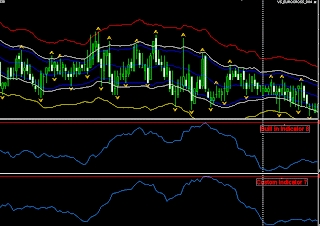
I make a lot experiment during this week with VS_EUROCROSS before updating its expiration time. I try to change the Simple Moving Average with another MA type such as Exponential MA and Linear Weighted MA for building Keltner Channel Indicator. I also change the Average True Range calculation by using same averaging method. Thus I have Keltner Channel indicator with more flexibility in averaging mode. I put both indicators in the same chart and you can see the difference even with the new Indicator I use Simple Moving Average to calculate the Average True Range. The blue channel is 20 period Keltner Channel using customs ATR.
 BUILT IN INDICATOR VERSUS CUSTOM INDICATOR
This chart is using Tadawul platform. If we look the chart should be more trade if we use new Keltner Channel Indicator then previous one. In Alpari, using this new Indicator doesn’t make any improvement (worse) with default trading time. But if I change trading time with open Hour 19 and close Hour 23, Using VS_EUROCROSS_D03 you can see the result.
 VS_EUROCROSS_D03 with custom ATR
But it is still worse. Because my experiment it made more profit with less trades.
 Less trades with bigger profit
 And with same setting on EurGbp
Perhaps next time we can have 2 trading time set and give difference risk, other thing that mostly spread during 19-23 time is still low.
 BUILT IN INDICATOR VERSUS CUSTOM INDICATOR
This chart is using Tadawul platform. If we look the chart should be more trade if we use new Keltner Channel Indicator then previous one. In Alpari, using this new Indicator doesn’t make any improvement (worse) with default trading time. But if I change trading time with open Hour 19 and close Hour 23, Using VS_EUROCROSS_D03 you can see the result.
 VS_EUROCROSS_D03 with custom ATR
But it is still worse. Because my experiment it made more profit with less trades.
 Less trades with bigger profit
 And with same setting on EurGbp
Perhaps next time we can have 2 trading time set and give difference risk, other thing that mostly spread during 19-23 time is still low.
Thursday, June 18, 2009
Profit Calculation
I make backtest today since I don't run my demo, and find something that I can't explain why it can be happened even in the back test. At the first time I guess that maybe there is something wrong, and then using my MQL version, I made back test in visual mode, and tell EA to show current pip profit in chart window.This is just calling my TotalProfit function in MQL4.
 Take a look at the left corner, even price at 1.5063/5066, but the total profit (pip) is 0.
Let see the last 3 trades. The first trade is executed at 1.5067. Then the second trade is triggered at 1.5075. The second trade is closed at 1.5069 and made profit about 6 pips (as much current ATR). The first trade still in the market until the third trade is triggered at 1.5077. When price (ask) hit 1.5071 (at this point our sum profit from 2 orders is 1, 1.5077-1.5071=5 and 1.5067-1.5071= -4), the EA close the profitable trade (3rd trade) and made profit 5 pips.
Unfortunately, when price (ask) hit 1.5066 the total profit (pip) that EA record is 0. And the EA didn’t close the first trade, then there is a spike after this, and hit 1st trade stop loss.
 Correct
I don’t know if it also happened at live trade not just in the back test. At the other picture the EA show current profit calculation correctly.
I try to close with 0 pips profit at this point by changing the target, and then I get slippage 2 pips. The order is closed at 1.5065/1.5068.
 Slippage
What I can say, this is always happen in our real trade. If you watch your trade carefully, then you may find sometimes your profit doesn’t change while market has been move for a pip.
 Take a look at the left corner, even price at 1.5063/5066, but the total profit (pip) is 0.
Let see the last 3 trades. The first trade is executed at 1.5067. Then the second trade is triggered at 1.5075. The second trade is closed at 1.5069 and made profit about 6 pips (as much current ATR). The first trade still in the market until the third trade is triggered at 1.5077. When price (ask) hit 1.5071 (at this point our sum profit from 2 orders is 1, 1.5077-1.5071=5 and 1.5067-1.5071= -4), the EA close the profitable trade (3rd trade) and made profit 5 pips.
Unfortunately, when price (ask) hit 1.5066 the total profit (pip) that EA record is 0. And the EA didn’t close the first trade, then there is a spike after this, and hit 1st trade stop loss.
 Correct
I don’t know if it also happened at live trade not just in the back test. At the other picture the EA show current profit calculation correctly.
I try to close with 0 pips profit at this point by changing the target, and then I get slippage 2 pips. The order is closed at 1.5065/1.5068.
 Slippage
What I can say, this is always happen in our real trade. If you watch your trade carefully, then you may find sometimes your profit doesn’t change while market has been move for a pip.
Tuesday, June 9, 2009
Working with Slippage
I try to optimize the closing trade function by forcing to close our trades with our price. What I do is checking the last known market price before sending to closing trade function. So the EA will always compare our last known price with current market price.
If the EA wants to close Long position than it must be happen if current price is higher or equal with the last known market price and vice versa. The expert will force to complete this action before new bar is coming. Once new bar is coming then the EA will wait an others logic for closing trade.
It might to be a compromise decision, because we have to decide to allow EA working with its logic at any price (no matter slippage), or forcing EA to close with exact price while allowing another logic to be waiting (back test will be differ after live trade).
If the EA wants to close Long position than it must be happen if current price is higher or equal with the last known market price and vice versa. The expert will force to complete this action before new bar is coming. Once new bar is coming then the EA will wait an others logic for closing trade.
It might to be a compromise decision, because we have to decide to allow EA working with its logic at any price (no matter slippage), or forcing EA to close with exact price while allowing another logic to be waiting (back test will be differ after live trade).
