


I want to explain in more detail how to configure VS_PipsCola_D01 trading time. This is to avoid mistakes as there are different time zones held by the broker. I will give examples of how to set the trading time on the broker Forex.Co.Jpy.
And again I would like to emphasize that VS_PipsCola_D01 not transact at weekend and in the beginning of the week. If you are still confused how to set RestrictionDay parameters, then you should just remember the rules. I created RestrictionDay Parameters to prevent the EA deal over the weekend and the beginning of market opening.
To set the trading time on ForexCoJpy then we need to know the time zone used by the broker. Currently, the time zone used by ForexCoJpy are GMT 9. And if I look at this broker does not implement Daylight Saving Time. I know it after seeing the losses that occurred in Charlotte, where the EA deal 1 hour early. At first I thought ForexCoJpy will switch their timezone to GMT 8 when DST ends. And apparently not, so I had to change the trading time.
Let the following parameters of the trading time to brokers ForexCoJpy VS_PipsCola_D01.
OpenHour = 5;
OpenMinute = 0;
CloseHour = 7;
CloseMinute = 59;
EnableXtraTime = False; Unless you want to use it, then adjust the position of True;
XtraCloseHour = 9;
XtraCloseMinute = 59;
For RestrictedDay settings, we can use DAY_OF_WEEK parameter to prevent the EA deal at the weekend. While we use Day_Of_Week2 parameter to prevent the EA deal in the beginning of week. You can just swap it. Furthermore, you can use it to prevent the EA deal on Days and hours you specify yourself. For example, if there is a major event that coincided with the trading time, then you can set this parameter to prevent the EA deal at the time the event occurred. Of course, after the event is finished you have to set it again to prevent EA transact at weekends and in the beginning of the week.
Market closure on forex.co.jpy happen on Saturday. For that the settings are:
DAY_OF_WEEK = 6;
Begin = 0;
End = 23;
To prevent the EA deal in Market Opening on Forex.Co.Jpy Broker:
DAY_OF_WEEK = 1;
Begin2 = 5;
End2 = 8;
Actually, if you fill with Begin2 = 0 and End2 = 23 then the result remains the same. I'm using Begin2 = 5 and End2 = 8 to clarify its usefulness, that preventing the EA deal in the beginning of the week.
Get Back Your Money

Showing posts with label External Variable. Show all posts
Showing posts with label External Variable. Show all posts
Sunday, November 14, 2010


Friday, November 12, 2010
VS_PipsCola_D01 Trading System Parameter
In this section I will explain the parameters of the indicators that are used by VS_Pipscola. So, if you want to optimize the parameters of vs_pipscola, hopefully this explanation can help you.
VS_PipsCola is an EA that works on 15 Minutes Chart. However, it actually observe H1 Time Frame to determine market conditions. Market conditions are determined based on the observations on CK_Speed, ATR, Keltner Channel and parabolic sar indicator. As for putting a more precise entry, EA observe a smaller time frame. Although the observe several time frames, but it use the same length period of CK_Speed, ATR, and Keltner Channel in all time frames observed by the EA. Besides, the EA also allows averaging system.
Here is an explanation of the parameters of VS_PipsCola associated with trading system.
double MasterPeriod = 5; This is the length period used by ATR, Keltner Channel and CK_Speed Indicator on all time frames observed by EA. The use of a single parameter is to facilitate you in doing optimization.
Because EA observes H1 Time Frame, I think this value should not be too big. If you want to do the optimization, I think the minimum value is 3 and the maximum value is 8.
double MaximumAtr = 45; This is similar to filter MaxDayAtr on vs_eurchf. Only VS_Eurchf using D1 Time Frame while VS_PipsCola use H1 Time Frame . The lower you set this parameter value, then a few transactions that may occur. We recommend that you set the value of this parameter refers to the stop losses you want to use. This means that the value of your stop losses should not be below the value of this parameter.
double H1InitialDev = 0.1; This parameter is used to adjust the deviation of Keltner Channel on H1 time frame. The larger the value of this variable the more difficult to place a trade.
double M15InitialDev1 = 0.8;
double M15InitialDev2 = 0.8;
The two variables above are used to adjust the deviation of Keltner Channel on the 15 Time Frame. PipsCola EA actually can be arranged to use a different deviation based on market condition. But if you want EA always uses the same deviation, then the two variables must be equal. Since these variables set the deviation of the Keltner Channel, so the smaller the value of these variables will make EA more aggressive.
If you optimize these variables, then the maximum possible results would be obtained if you set a value of M15InitialDev1 less than M15InitialDev2. While the optimal value of the two variables is likely to lie between 0.5 to 1
int MinRange = 5; parameter is similar to the one owned by vs_eurocross. It set the minimum distance between price and moving average. And the rule is clear, the value of this parameter is greater than the Spread + 1.
double MinRangePerTrade = 10; If EA is allowed to take more than 1 same position, then this parameter will set the minimum distance between the same trade position.
int MaxTradePerBar = 1; this parameter to set how many open positions that may be taken on every bar. I said open position, because although the value of this parameter is 1, the EA may transact more than 1 per bar. Suppose that EA took a position and then close the position in the same bar, so if there is a new signal EA will continue to execute the signal.
But despite it all, this parameter can make EA become more aggressive even if you do not optimize the other parameters.
bool AllowHedging = true; this parameter to set whether the EA could take 2 opposite positions (buy and sell). Of course this is closely related to the regulation that is used by each broker.
bool UseSecondaryPeriod = false;
double SecondaryPeriod = 3;
I deliberately wanted to explain these variables just in the last section. This is because you can ignore these two variables. But if you are curious, then this is actually the second Keltnert channel observed by the EA in the H1 time frame. You can optimize this parameter. But you have to adjust the UseSecondaryPeriod with True.And another thing if you manage to set SecondariPeriod at 5, means not to change anything, because it has the same length period of MasterPeriod. It is highly experimental, so please try it yourself. Although in my opinion the value of this parameter is only optimal if less than MasterPeriod, but I never optimize it.
VS_PipsCola is an EA that works on 15 Minutes Chart. However, it actually observe H1 Time Frame to determine market conditions. Market conditions are determined based on the observations on CK_Speed, ATR, Keltner Channel and parabolic sar indicator. As for putting a more precise entry, EA observe a smaller time frame. Although the observe several time frames, but it use the same length period of CK_Speed, ATR, and Keltner Channel in all time frames observed by the EA. Besides, the EA also allows averaging system.
Here is an explanation of the parameters of VS_PipsCola associated with trading system.
double MasterPeriod = 5; This is the length period used by ATR, Keltner Channel and CK_Speed Indicator on all time frames observed by EA. The use of a single parameter is to facilitate you in doing optimization.
Because EA observes H1 Time Frame, I think this value should not be too big. If you want to do the optimization, I think the minimum value is 3 and the maximum value is 8.
double MaximumAtr = 45; This is similar to filter MaxDayAtr on vs_eurchf. Only VS_Eurchf using D1 Time Frame while VS_PipsCola use H1 Time Frame . The lower you set this parameter value, then a few transactions that may occur. We recommend that you set the value of this parameter refers to the stop losses you want to use. This means that the value of your stop losses should not be below the value of this parameter.
double H1InitialDev = 0.1; This parameter is used to adjust the deviation of Keltner Channel on H1 time frame. The larger the value of this variable the more difficult to place a trade.
double M15InitialDev1 = 0.8;
double M15InitialDev2 = 0.8;
The two variables above are used to adjust the deviation of Keltner Channel on the 15 Time Frame. PipsCola EA actually can be arranged to use a different deviation based on market condition. But if you want EA always uses the same deviation, then the two variables must be equal. Since these variables set the deviation of the Keltner Channel, so the smaller the value of these variables will make EA more aggressive.
If you optimize these variables, then the maximum possible results would be obtained if you set a value of M15InitialDev1 less than M15InitialDev2. While the optimal value of the two variables is likely to lie between 0.5 to 1
int MinRange = 5; parameter is similar to the one owned by vs_eurocross. It set the minimum distance between price and moving average. And the rule is clear, the value of this parameter is greater than the Spread + 1.
double MinRangePerTrade = 10; If EA is allowed to take more than 1 same position, then this parameter will set the minimum distance between the same trade position.
int MaxTradePerBar = 1; this parameter to set how many open positions that may be taken on every bar. I said open position, because although the value of this parameter is 1, the EA may transact more than 1 per bar. Suppose that EA took a position and then close the position in the same bar, so if there is a new signal EA will continue to execute the signal.
But despite it all, this parameter can make EA become more aggressive even if you do not optimize the other parameters.
bool AllowHedging = true; this parameter to set whether the EA could take 2 opposite positions (buy and sell). Of course this is closely related to the regulation that is used by each broker.
bool UseSecondaryPeriod = false;
double SecondaryPeriod = 3;
I deliberately wanted to explain these variables just in the last section. This is because you can ignore these two variables. But if you are curious, then this is actually the second Keltnert channel observed by the EA in the H1 time frame. You can optimize this parameter. But you have to adjust the UseSecondaryPeriod with True.And another thing if you manage to set SecondariPeriod at 5, means not to change anything, because it has the same length period of MasterPeriod. It is highly experimental, so please try it yourself. Although in my opinion the value of this parameter is only optimal if less than MasterPeriod, but I never optimize it.
Thursday, November 11, 2010
VS_PipsCola_D01 Money Management Parameter
I think VS_PipsCola_D01 was ready for distribution. But before that I better explain its parameters first. I probably will not include the manual, so I'll publish them all online via this blog. And for simplicity I will divide these parameters into several sections. And this section will explain the parameters associated with Money Management or any parameter that affect in your risk. For Trading Time section, you can see in the VS_PipsCola Trading Time Parameter.
It could be said that all of my previous EA will fail to calculate Lot size correctly on non Dollars account. Therefore, I try to change it in order to accurately calculate the lot size for all types of deposits. Hopefully, this formula works, but if not you should be forced to perform calculations manually.
The following parameters are used by VS_PipsCola_D01 related to Money Management.
MM bool = true. This parameter is telling the EA whether to calculate the lots base on the available margin. If this parameter is set with True value, means that EA will calculate the number of lots based on the Free Margin. Otherwise the EA will look to the other parameter to determine the lot size.
Double RiskPerTrade = 5; parameter is only meaningful if you set the MM parameter with True. RiskPerTrade means the amount of margin that will be used for 1 transaction. RiskPerTrade = 5 means that the margin for each transaction is 5 percent. However, the total margin that may be used by the EA is also influenced by other variables namely MaxTradePerPosisition.
MaxTradePerPosition = 3; this parameter to set the number of transactions allowed for each position (Buy / Sell). However, this parameter will affect your risk, because the larger the value of this parameter, the more margin to be used. If you set RiskPerTrade with 5, and your MaxTradePerPosition is 3, meaning the amount of margin that is used to open the three transactions are 5 x 3 = 15.
Double Lots = 0.1; parameter is only meaningful if you set MM parameters with the False value. Regardless of the value that you fill in this parameter, over the free margin is sufficient, then this parameter will be used to determine lot size for every 1 transaction.
int StopLoss = 60; I think this is very clear parameters. You must determine how many stop losses are used for each transaction. You do not need to worry if your broker uses 4 digits or 5 digits. 60 always means 60 pips does not matter with your broker digits.
int MaxLossesToStopTrading = 1; Although this parameter does not affect the calculation MoneyManagement, but this is to adjust your risk management. This parameter will tell the EA to stop to take a position if EA had suffered losses at the value of this parameter. Yet EA will continue to maintain any position that is still open.
It could be said that all of my previous EA will fail to calculate Lot size correctly on non Dollars account. Therefore, I try to change it in order to accurately calculate the lot size for all types of deposits. Hopefully, this formula works, but if not you should be forced to perform calculations manually.
The following parameters are used by VS_PipsCola_D01 related to Money Management.
MM bool = true. This parameter is telling the EA whether to calculate the lots base on the available margin. If this parameter is set with True value, means that EA will calculate the number of lots based on the Free Margin. Otherwise the EA will look to the other parameter to determine the lot size.
Double RiskPerTrade = 5; parameter is only meaningful if you set the MM parameter with True. RiskPerTrade means the amount of margin that will be used for 1 transaction. RiskPerTrade = 5 means that the margin for each transaction is 5 percent. However, the total margin that may be used by the EA is also influenced by other variables namely MaxTradePerPosisition.
MaxTradePerPosition = 3; this parameter to set the number of transactions allowed for each position (Buy / Sell). However, this parameter will affect your risk, because the larger the value of this parameter, the more margin to be used. If you set RiskPerTrade with 5, and your MaxTradePerPosition is 3, meaning the amount of margin that is used to open the three transactions are 5 x 3 = 15.
Double Lots = 0.1; parameter is only meaningful if you set MM parameters with the False value. Regardless of the value that you fill in this parameter, over the free margin is sufficient, then this parameter will be used to determine lot size for every 1 transaction.
int StopLoss = 60; I think this is very clear parameters. You must determine how many stop losses are used for each transaction. You do not need to worry if your broker uses 4 digits or 5 digits. 60 always means 60 pips does not matter with your broker digits.
int MaxLossesToStopTrading = 1; Although this parameter does not affect the calculation MoneyManagement, but this is to adjust your risk management. This parameter will tell the EA to stop to take a position if EA had suffered losses at the value of this parameter. Yet EA will continue to maintain any position that is still open.
VS_PipsCola_D01 Trading Time Parameter
I think VS_PipsCola_D01 was ready for distribution. But before that I better explain its parameters or external variable first. I probably will not include the manual, so I'll publish them all online via this blog. And for simplicity I will divide these parameters into several sections. And this section will explain the parameters associated with Trading Time setting. For the Money Management section, you can find in VS_PipsCola_d01 Money Management Parameter.
Default trading time is 21-23GMT+1. So please adjust your trading time if your broker time zone is not GMT+1. The following parameters are related to trading hours:
Opening
OpenHour = 21;
OpenMinute = 0;
Two variables above are used to set when to start trading. Their combination will tell the EA what time to begin to trade. OpenHour=12 and OpenMinue=0 means that EA will start to trade at 21.00.
Closing
CloseHour = 23;
CloseMinute = 59;
Just like the opening, CloseHour and CloseMinute are used to set when to stop trading. Combination of CloseHour and CloseMinute will tell the EA what time to stop to trade. CloseHour=23 and CloseMinute=59 means EA will stop to trade at 23.59.
Extra Time
bool EnableXtraTime = true;
int XtraCloseHour = 1;
int XtraCloseMinute = 59;
The three parameters above may be rarely used by EA. I add this parameter to increase the trading hours. But this only applies if EA still has an open position. And EA is just going to take the same position with the open position. For example if the EA still hold a Long position and the trading hour has been passed, if extra time is enable then the EA will only take a Long position and never take the opposite position.
To enable the extra time you have to adjust the EnableXtraTime parameter with True. The rest it just like to set closing hour. So XtraCloseHour=1 and XtraCloseMinute=59 means the extra time will end at 1.59.
Restricted Day
int DAY_OF_WEEK = 5;
int Begin = 0;
int End = 23;
Day_of_Week2 int = 1;
Begin2 int = 0;
End2 int = 5;
In general I do not allow the EA to trade at the Beginning and Closing market. And to arrange for the EA does not trade on these days, I am providing as much as 6 parameters.
Parameters Day_of_Week2 and DAY_OF_WEEK can be filled between 0 to 6 that represents the days from Sunday to Saturday. While the Begin, End, Begin2 and End2 parameters represent the hour for the day.
So DAY_OF_WEEK = 5, Begin = 0 and End = 23, mean EA is not allowed to transact on Friday from 0 to 23 o'clock. While DAY_OF_WEEK = 1, Begin2 = 0, and End2 = 5 means that the EA should not trade on Monday from at 0 to 5 o'clock.
All you have to note that this is a configuration for Alpari server which their Time Zone is GMT+1. And you should also remember, that the trade in Alpari Server starts Monday at 0 GMT+1, while the actual Forex Market is open on the Sunday at 23 GMT+1. So if even if your broker time zone is the same with Alpari, you also need to find out if they start trading at 23 or 0. If your broker start to trade on Sunday at 23 GMT+1 o'clock, prevent ea to trade at this time.
Default trading time is 21-23GMT+1. So please adjust your trading time if your broker time zone is not GMT+1. The following parameters are related to trading hours:
Opening
OpenHour = 21;
OpenMinute = 0;
Two variables above are used to set when to start trading. Their combination will tell the EA what time to begin to trade. OpenHour=12 and OpenMinue=0 means that EA will start to trade at 21.00.
Closing
CloseHour = 23;
CloseMinute = 59;
Just like the opening, CloseHour and CloseMinute are used to set when to stop trading. Combination of CloseHour and CloseMinute will tell the EA what time to stop to trade. CloseHour=23 and CloseMinute=59 means EA will stop to trade at 23.59.
Extra Time
bool EnableXtraTime = true;
int XtraCloseHour = 1;
int XtraCloseMinute = 59;
The three parameters above may be rarely used by EA. I add this parameter to increase the trading hours. But this only applies if EA still has an open position. And EA is just going to take the same position with the open position. For example if the EA still hold a Long position and the trading hour has been passed, if extra time is enable then the EA will only take a Long position and never take the opposite position.
To enable the extra time you have to adjust the EnableXtraTime parameter with True. The rest it just like to set closing hour. So XtraCloseHour=1 and XtraCloseMinute=59 means the extra time will end at 1.59.
Restricted Day
int DAY_OF_WEEK = 5;
int Begin = 0;
int End = 23;
Day_of_Week2 int = 1;
Begin2 int = 0;
End2 int = 5;
In general I do not allow the EA to trade at the Beginning and Closing market. And to arrange for the EA does not trade on these days, I am providing as much as 6 parameters.
Parameters Day_of_Week2 and DAY_OF_WEEK can be filled between 0 to 6 that represents the days from Sunday to Saturday. While the Begin, End, Begin2 and End2 parameters represent the hour for the day.
So DAY_OF_WEEK = 5, Begin = 0 and End = 23, mean EA is not allowed to transact on Friday from 0 to 23 o'clock. While DAY_OF_WEEK = 1, Begin2 = 0, and End2 = 5 means that the EA should not trade on Monday from at 0 to 5 o'clock.
All you have to note that this is a configuration for Alpari server which their Time Zone is GMT+1. And you should also remember, that the trade in Alpari Server starts Monday at 0 GMT+1, while the actual Forex Market is open on the Sunday at 23 GMT+1. So if even if your broker time zone is the same with Alpari, you also need to find out if they start trading at 23 or 0. If your broker start to trade on Sunday at 23 GMT+1 o'clock, prevent ea to trade at this time.
Wednesday, August 5, 2009
Variable Optimization
What make me enjoy with VS_EuroCross_D05 that it is more profitable with any previous version just using single trade per position. If you would like to optimize this VS_EuroCross_D05, try to optimize the MinRange and MinProfit variable. In this case you should set the SpreadFilter to false. You can apply UseTradeRange and UseRange after finding suitable result, other way you can directly to optimize those variables.
I made 2 back test before releasing VS_EuroCross_D05. The first back test just to set UseTradeRange Variable with True, and the second I set the MinProfit with 2.

UseTradeRange True
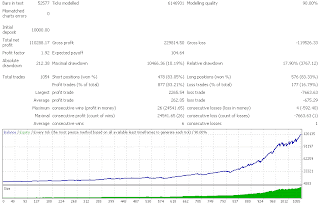
MinTarget True
I made 2 back test before releasing VS_EuroCross_D05. The first back test just to set UseTradeRange Variable with True, and the second I set the MinProfit with 2.


Monday, August 3, 2009
VS_EuroCross_d05 External Variables
Below the list of new external variables that are used in VS_EuroCross_D05.
extern double MinRange =3
Unlike any previous version, now we can use flexible range (distance from MA) to execute the trade. Inside the code, this value will be added with current spread. Thus this is just equal with double spread (Spread on my backtest is 3).
extern bool SpreadFilter=true
If you want to keep using double spread filter, then just set this variable to True.
extern double MinProfit =1
It doesn't mean if you set this variable with 1, then expert will close any orders with 1 pip profit. But since most profitable trades are closed when price hits MA, then the expert will see this variable when price hit MA. Thus if you pay for commission, set this value with 2.
extern bool UseRange =false
Basically it just calculate current range. Set this value to True. My backtest shows better result by using this filter.
extern bool UseTradeRange=false;
I set this value to True, when posting VS_EuroCross_D05 backtest result. Just compare between with FixedTP, the profit factor is equal but VS_EuroCross_D05 has bigger profit then FixedTP.
extern double MinRange =3
Unlike any previous version, now we can use flexible range (distance from MA) to execute the trade. Inside the code, this value will be added with current spread. Thus this is just equal with double spread (Spread on my backtest is 3).
extern bool SpreadFilter=true
If you want to keep using double spread filter, then just set this variable to True.
extern double MinProfit =1
It doesn't mean if you set this variable with 1, then expert will close any orders with 1 pip profit. But since most profitable trades are closed when price hits MA, then the expert will see this variable when price hit MA. Thus if you pay for commission, set this value with 2.
extern bool UseRange =false
Basically it just calculate current range. Set this value to True. My backtest shows better result by using this filter.
extern bool UseTradeRange=false;
I set this value to True, when posting VS_EuroCross_D05 backtest result. Just compare between with FixedTP, the profit factor is equal but VS_EuroCross_D05 has bigger profit then FixedTP.
Wednesday, July 15, 2009
Showing The Target (New Update)
I add another feature to VS_EUROCROSS that allowing EA to show its target. On my experience during last two weeks, it seems the Expert suffered too much slippage. This is especially when Expert holds more then 1 positions and tries to close all position at once.
What I see if price make up down move within 6 pips will make EA react and often EA will get requote. After make several test finally I can add this feature to VS_EUROCROSS without affecting all the exit rules.
POSSIBLE PROBLEM IN LIVE TRADE
Although backtest show there is no much difference when using fixed target (I am not sure but its looked better), but something difference may occur in live trade. All broker can rise their stoplevel and if the stoplevel become the highest then our signal filter or MyOwnTarget, then the target become meaningless. But still it is useful when somehow you loose connection to your Server. Although it is possible to tell EA to set the target every tick or bar, but I decide to let EA doing this thing just when new position is taken. But still the EA will force to give fixed target when it failed in the first attempt. Therefore each position will has difference fixed target.
Another possible problem is the freeze level. This is happened when the expert tries to close an open position while its target is very close with market’s price.
To disabled this feature, then you can set the VISIBLETP variable with FALSE, because I let the default value with TRUE.
You can see my MT4stats; the trades on EURGBP have a fixed target and one of them get hit.
 Showing the Target
What I see if price make up down move within 6 pips will make EA react and often EA will get requote. After make several test finally I can add this feature to VS_EUROCROSS without affecting all the exit rules.
POSSIBLE PROBLEM IN LIVE TRADE
Although backtest show there is no much difference when using fixed target (I am not sure but its looked better), but something difference may occur in live trade. All broker can rise their stoplevel and if the stoplevel become the highest then our signal filter or MyOwnTarget, then the target become meaningless. But still it is useful when somehow you loose connection to your Server. Although it is possible to tell EA to set the target every tick or bar, but I decide to let EA doing this thing just when new position is taken. But still the EA will force to give fixed target when it failed in the first attempt. Therefore each position will has difference fixed target.
Another possible problem is the freeze level. This is happened when the expert tries to close an open position while its target is very close with market’s price.
To disabled this feature, then you can set the VISIBLETP variable with FALSE, because I let the default value with TRUE.
You can see my MT4stats; the trades on EURGBP have a fixed target and one of them get hit.
 Showing the Target
Sunday, June 28, 2009
VS_EUROCROSS_D04 Now Available
A month has been passed, and it is time for VS_EUROCROSS_D04. Again there is no any change in the main system, except adding expiration as usual. But since this version I decide to allow the EA using built in ATR or custom ATR. And other thing it is now using ECN style.
There are new External Variables in this version:
int Margin = 100;
This is Money Management feature that allow you to set the percentage of your balance in case you run several EA at the same time. For example if you have 10 K in your balance, you can tell the EA just to use 20 percent from your balance before calculating the risk.
Bool UseAtrMod = false;
This is the variable that you have to try. If you set it false then it just like previous version. But make sure you use the historical data from your broker before testing this variable.
As my last post before, I try to optimize this EA to work earlier then its default trading time. What the setting that I use with D03 version in the backtest are:
OpenHour=19;
CloseHour=23;
UseAtrMod=true;
MyOwnTarget=5;
There are new External Variables in this version:
int Margin = 100;
This is Money Management feature that allow you to set the percentage of your balance in case you run several EA at the same time. For example if you have 10 K in your balance, you can tell the EA just to use 20 percent from your balance before calculating the risk.
Bool UseAtrMod = false;
This is the variable that you have to try. If you set it false then it just like previous version. But make sure you use the historical data from your broker before testing this variable.
As my last post before, I try to optimize this EA to work earlier then its default trading time. What the setting that I use with D03 version in the backtest are:
OpenHour=19;
CloseHour=23;
UseAtrMod=true;
MyOwnTarget=5;
Tuesday, June 2, 2009
Introducing My VS_EURGBP
Personally I have tried several method to scalp this pair, but the end I realize that the most working idea is just the trading time. I just use 20 period WPR to trigger the entry and make sure the distance between current price and MA (50) is not less then N + Spread where N can be our minimum target. Of course in fact our trade could be placed higher/lower because it must executed while WPR showing Overbought/Oversold value.
The last filter is 50 Period CK_Speed indicator,same period with MA. You can test to use any other indicator, but may be you can start without using any indicator, and show the result.
Here are the list of external variables that EA use, mostly it has the same variables with EUROCROSS Version, except the list below:
To protect us going to deep hole we can tell the EA to stop working and close any open position
extern int NumberOfLoss =2;
extern bool TradeAfterLoss=false;
extern bool CloseAllPositionAfterLoss=true;
extern bool Turbo=falseThis is usefull if you set your MaxTradePerPosition = 4.
extern bool ContinuesTrade=false Not repeating same trade that make a loss.
extern int MaDinstance=2; Try Optimize this value
Mostly the list variable below is working if MaxTradePerPosition is 4
extern int AveragingStyle=0;
extern int SpreadMultiplyer=1;
extern int FixedAveraging=6;
extern int AtrPeriod=5;
The last filter is 50 Period CK_Speed indicator,same period with MA. You can test to use any other indicator, but may be you can start without using any indicator, and show the result.
Here are the list of external variables that EA use, mostly it has the same variables with EUROCROSS Version, except the list below:
To protect us going to deep hole we can tell the EA to stop working and close any open position
extern int NumberOfLoss =2;
extern bool TradeAfterLoss=false;
extern bool CloseAllPositionAfterLoss=true;
extern bool Turbo=falseThis is usefull if you set your MaxTradePerPosition = 4.
extern bool ContinuesTrade=false Not repeating same trade that make a loss.
extern int MaDinstance=2; Try Optimize this value
Mostly the list variable below is working if MaxTradePerPosition is 4
extern int AveragingStyle=0;
extern int SpreadMultiplyer=1;
extern int FixedAveraging=6;
extern int AtrPeriod=5;
Sunday, May 17, 2009
What new in the latest update (5-17-2009)
I try to solve some problems that rise when using this expert on different brokers.
Fixing error number 131, this is Order Send Error caused by invalid trade volume size. This is happened on broker that their Lot Step others than 0.1 or 0.001.
Add new external variable Monday Start. You should give this value buy adding your Open Hour variable with 2.
Add sound alert. Yeah, the expert will play alert.mid when it open a trade.
Fixing error number 131, this is Order Send Error caused by invalid trade volume size. This is happened on broker that their Lot Step others than 0.1 or 0.001.
Add new external variable Monday Start. You should give this value buy adding your Open Hour variable with 2.
Add sound alert. Yeah, the expert will play alert.mid when it open a trade.
Wednesday, March 11, 2009
External Variable
I am so sorry to forget to explain about money management rule.
extern bool MM = true;
Set this value to FALSE if You don't want to use money management.
extern int Risk = 50;
The value in percentage of current margin.
The important point here that Your Risk will be divided by variabel MaxTradePerPosition. For example if MaxTradePerPosition are 4, then it's mean each trade will risk about 12.5 percent. Therefore reducing MaxTradePerPosition will not reduce your risk. But increasing MaxTradePerPosition will reduce Your Risk.
extern double Lots = 0.1;
This is the lot size if You don't use money management.
extern int Slippage = 3;
Remember that You have to match your brokers quotation. If they use fractional pip, You should use 30, not 3.
extern int StopLoss = 60;
This is the stop loss that we use in pip. But this value not depend on your broker quotation.
extern bool MM = true;
Set this value to FALSE if You don't want to use money management.
extern int Risk = 50;
The value in percentage of current margin.
The important point here that Your Risk will be divided by variabel MaxTradePerPosition. For example if MaxTradePerPosition are 4, then it's mean each trade will risk about 12.5 percent. Therefore reducing MaxTradePerPosition will not reduce your risk. But increasing MaxTradePerPosition will reduce Your Risk.
extern double Lots = 0.1;
This is the lot size if You don't use money management.
extern int Slippage = 3;
Remember that You have to match your brokers quotation. If they use fractional pip, You should use 30, not 3.
extern int StopLoss = 60;
This is the stop loss that we use in pip. But this value not depend on your broker quotation.
