Get Back Your Money

Monday, June 11, 2012

VS_FBO Backtest of Each Signal

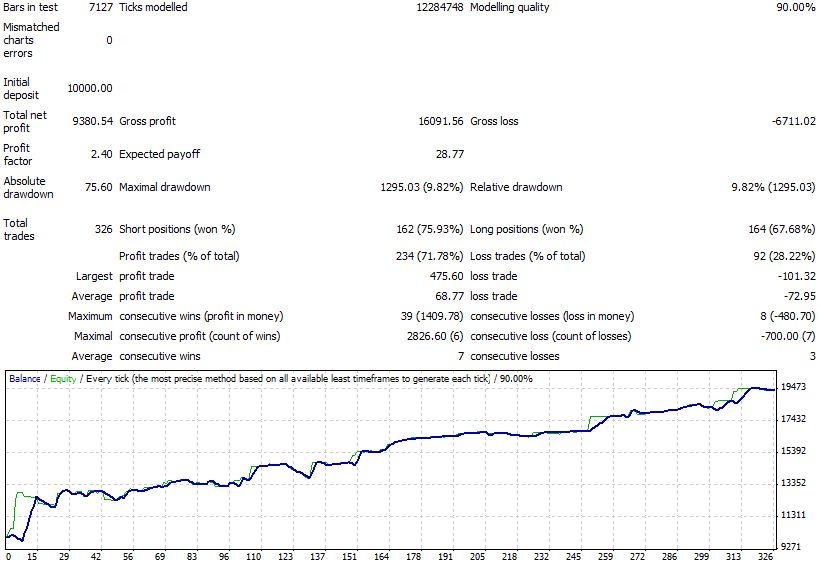
VS_FBO EA has 4 signals that can be activated separately. Thus you have the freedom to choose which signal will be activated. Our default setting are using 3 signals. We have shown backtest result of VS_FBO using default setting. I did backtest again, but this time i did it 3 times for every year. First backtest using signal 1 and signal 2. Second backtest using signal 3 only. And the last using signal 4 only.
Equity curve 2009

Equity curve 2010

Equity curve 2011

Sunday, June 10, 2012

VS_FBO False Breakout Expert Advisor

We present a new EA. But this time is no longer a scalping EA. Instead it could be categorized as a mid / long term EA. Using a false breakout strategy and works on the H1 time frame of the EURUSD pair. Optimization is done by using data from 2009 to 2011. Here we show the backtest results of  VS_FBO EA.
Backtest result in 2009


Backtest result in 2010


Backtest result in 2011


Out of Sample Jan-Apr 2012


Friday, March 18, 2011

Daylight Saving Time (DST) and Changes in the Trading Time

Finally after 3 months, today EA Pipscola_Y02 again suffered big losses. And once again this happens when the DST on / off is applied. In accordance with the schedule, began on March 13, 2011 the United States to apply the Daylight Saving Time (DST)and then to be followed by European countries on the last Monday in March.
I do not want to blame the time as the cause of this loss. Because even if I change the trading time 1 hour earlier, it's still could not prevent me from the loss. But at least I already have a conclusion about what to do when there is change in time zones.
Adjust Trading Time with the U.S. Time Zone
When the application of Daylight Saving Time (DST)ends, I have an opinion about what should be done. And I think that right now I have to do the same. We must adjust the time trading with the time zone used on the American market. Actually the logic is very simple, because we transact after closing the American market. It's only natural if we follow the time zone used by the U.S. market.
It is different if you run a trading system that deal only in the European Market. Either simultaneously with the Asian market or not, but before the U.S. markets open. In this case, you do not need to change trading time.
Finally, for the moment I change the trading time of Pipscola EA to 22-0 (GMT +1).

Tuesday, March 8, 2011

Variations of Range Breakout Strategy

N-Bar Range Breakout
Range breakout is a very simple trading system that is very easy to learn for beginner traders. Observe the highest/lowest in 1 or more bars. Put a limit order a few pips away from that highest/lowest. This is the classic N-bar breakout strategy.
Session Range Breakout
This is just a variation of classic N-Bar range breakout strategy. The main difference of this system with N-Bar range breakout is the bar(s) that was observed to be static and associated with the time. Although the session in the forex is often associated with time zones (Asia, Europe and America), but in this case does not always mean that. Because they are static, the rules of this system : "Observe the highest/lowest of the HH:MM to HH:MM".
Opening Range Breakout
I think this system is still a variation of classic N-Bar range breakout. This system is an adaptation of the stock trading system called the Early Morning Breakout System.
This term is actually less suitable in Forex. This is because every Forex broker uses a different time zone.
Bar 0(GMT +1) Range Breakout
Now it's up to you want to call what this breakout kind of. Observations made on H1 timeframe. And probably only suitable for the USDJPY pair. I didn't test it yet on other pair.
For more details, I make an EA to test this system. I arranged to take buy position when price penetrates the high (bar 0 gmt +1) + 10 pips. And vice versa on the sell position. I do not use a limit order and let the EA work in stop and reversal mode. But I do not restrict to just open a trade position. If yesterday's EA took a buy position, and if today prices penetrate the high (bar 0 gmt +1)+10 pips, EA will add a new buy position.

Tuesday, February 15, 2011

My Backtest is Running Slowly

I think there is something very disturbing in the development of EA Pipscola. EA is running very slow in backtest mode. There are several possibilities that be the cause. I read some suggestions for upgrading a PC that I use. Others suggested to optimize the program code on Indicator and Expert Advisor.
But the problems that I experienced only occur in the period 2009-2010. Weird is not it? For more details, as I do backtest using data from the period 2005-2008, the time needed to complete this process faster than the period 2009-2010. This is very annoying. To be honest until now I can not explain why this could occur. But from this incident I could learn a few things.
Processor
Processor is the core of a computer. The speed and performance of a PC can be seen from the processor it uses. Processor that we usually use today are no longer using a core, but consists of several cores. Okay, it allows us to open several applications at once (multitasking). It's nice when we're optimizing an EA and at the same time still be able to enjoy High Definition video.
Maybe you think if I let Metatrader run alone then the optimization process will run faster. Unfortunately what you think only happens if my computer is still using single core processor. If my computer uses dual-core processor, then there is a unused core practically by Metatrader. EA only runs on a single thread. Even all the EA that are running on a Metatrader share the same thread.
Optimizing the code
In the end I found a way to increase the performance of EA Pipscola during backtest. Apparently myscreen function () which I use to display some information on the chart causes backtest process becomes very slow. So I modify the code to be executed only during live trading. You do this by adding the code
if (! IsTesting ())
just before calling
myscreen ();
. So the complete code is now
if (! IsTesting ()) myscreen ();
this code can be applied to all versions of Pipscola. This optimization can improve the performance of EA Pipscola more than 20% during backtest.

Sunday, January 2, 2011

PipsCola_Y02

Happy New Year 2011. Hopefully this year to be better than last year. I want to tell you that Pipscola Y version will soon be updated. Similarly, the version of D. But time will not be the same, because I still need a little time to complete the version of D. And I'll send this update to your mail box tonight.
Changes to the version of Y only occurs in an exit rule. In version PipsCola_Y01 exit only determined by the value of ATR (Average True Range) and MaxProfit. So in version PipsCola_Y02 just reinforces that EXIT must be done above and below the Moving Average on the time frame H1.
External Variable PipsCola_Y02
MaTP
To adapt the new exit strategy, I added a new External Variable. The default value of this (MaTP) parameter is 5.
If you want EA always close the all position above / below the MA, then you can set the parameters MaxTP in value as much as possible, say 100.
MinLevel
This parameter set a filter that is owned by PipsCola_Y02. In previous versions, this parameter is hidden. Now you can optimize it. The default value is 0.4.
VS_Pipscola_Y02 use charlotte3.dll library version 1.0.0.2. You have to rename the previous library to make it work on the same terminal.
Backtest result (Spread is 2.8, and some missing historical data in October 2010):

Monday, December 6, 2010

VS_PipsCola_Y01 Backtest Result


This is the backtest result of VS_PipsCola_Y01 EA. I use historical data from Alpari broker. Backtest period is January 2009 to October 2010, while spreads in this backtest is 2.8.
I think between all my EA, then this VS_PipsCola_Y01 that gives the best backtest result on USDJPY pair. Unfortunately the filter which is used by this EA may not work well when tested using historical data from other brokers.
Actually I have some variety in this EA, only because of time constraints I did not get to test everything. So I thought I'd better release a version of Y01 to have time to test all such strategy.

Sunday, December 5, 2010

VS_PipsCola_Y01 Trading System Parameter

Here is an explanation of the parameters relating to the trading system. For parameters associated with Money Management you can see into VS_PipsCola_D01 Money Management Parameters. Similarly, the parameters associated with the Trading Time, you may refer to VS_PipsCola_D01 Trading Time Parameters.
MaxProfit = 10, this parameter is similar with vs_eurocross has. This parameter serves to set the maximum profit in pip value.
MasterPeriod = 3; this parameter set period of keltner channel on the Time Frame H1.
SignalPeriod = 12;
ChannelPeriod = 11;
I think if you want to optimize VS_PipsCola_Y01, then just just optimize these two parameters. However for a complete optimization, you can also optimize the MinRangePerTrade and MasterPeriod parameter.
PipAfterFractal = 2; VS_PipsCola_Y01 using fractal trailing stop. This parameter controls how many pips pips from the fractal the stop losses is placed. And You need to know trailing stop is activated only after trading hours passed.
I think it's just that I need to explain. Since all other parameters similar to those in VS_PipsCola_D01.

Thursday, December 2, 2010

I Thank You

Actually I hope today I can send VS_PipsCola_Y01 to all of the users of PipsCola EA. However, because of one thing, I can not do that today. But I'm still trying to get it done this weekend.
I also want to thank the blogger who has written reviews about Volatily-Scalp EA. Whether it be in the form of forward test or also doing translation into Japanese. That's why I've put these links on this blog. And I try to always update it, or contact me if you want to place your link.
And specifically if you are in Japan, you can visit this blog. I thanked him for his efforts that translate PipsCola EA manual into Japanese.

Tuesday, November 30, 2010

Trading Result November 30, 2010

Today's trading results are positive. Charlotte produced 3 pips while VS_PipsCola_D01 produced 12 pips. Although the profit gained less than a week ago, but at least VS_PipsCola_D01 always give more than 10 pips profit. Not only that, the average holding time is relatively short. You can analyze it through my myfxbook.
As I have often expressed that there would be Pipscola new version to work in pair except for EURUSD. And it seems it is the USDJPY pair. But unfortunately this new version is not in the form of an upgrade from older version. However, this is a new EA. I'm very difficult when trying to combine them, so I thought its better to separate them. And its name is VS_PipsCola_Y01.
I think 1 or 2 days ahead, this EA will arrive in your paypal mailbox.

Friday, November 26, 2010

Channel Trading, Scalping With Keltner Channel

One of the most complicated thing that I feel when making Volatily Scalp system is anticipating a drastic decline of Average True Range (ATR) in record time. As a scalping system based on the trading channel, determining the length of the period Keltner Channel is very important. This is because the channel width of the Keltner Channel indicator can change over time depending on market volatility.
In the Channel trading, generally upper channel and lower channel act as overbought and oversold levels. Buy position is taken when the price hits or below the lower channel and sell position taken when price hit or above the upper channel. No matter with indicators that used to create the channel. As for an exit strategy there are many options but generally is the opposite of the entry signal itself.
Now let us look at the chart below. On this chart I put a Keltner Channel indicator (20.2). Red vertical line to mark the beginning of the transaction (at 21 GMT 1). I also placed an indicator CK_Speed (20.50) and ATR. (20).
It should VS_Eurocross can get sell signal as I describe in the chart above. Although the position of an exit may be slightly different. But what I want to show is how the system with the Keltner channel (20.2) miss a couple of profitable trades. Therefore, I draw 2 horizontal lines that act as a channel to clarify what I mean.
I've been plagued with this problem. And it seems impossible to know what is the optimal length of Keltner Channel Period at any time. But when I'm working on EA's Charlotte, I always strive to capture this pattern. I use the High / Low of the last 2 bars when the
entry signal occurs as a place of exit. The results with the same chart as above, charlote EA is more aggressive.

Friday, November 19, 2010

Trading Result November 19, 2010

I do not know what happened with my Mt4stats. Detailed statement was not published correctly. So I will publish my trading results today. But because today is the last day in this week's for EA to work, then I will post the results of trading in a week.
Today VS_PipsCola_D01 EA gives very good results where the EA makes profit of 15 pips. That means a quarter of the stop losses. In contrast to yesterday where the EA deal when liquidity is very low, today EA deal while liquidity is still high. All transactions are made when Average True Range ATR (5) is still above 10 points and the transaction can be closed quickly. And I think this is in conformity with what I expected. Stay ahead we see whether such results could be more frequently obtained.
Todays result
For the trading results in a week then the results remain positive. This is because charlotte2 more aggressive this week so it can cover the losses suffered by VS_PipsCola_D01. It seems they are the right partner.
Weekly Result
Regarding the development of VS_PipsCola, right now I still focus on the pair USDCHF and USDJPY. There is a good improvement of the USDCHF pair. But on the other hand Charlotte integration into PipsCola also went smoothly. Hopefully
PipsCola update can be released as soon as possible . If its possible in the beginning of December or at least before the new year. I'll be working on it

Thursday, November 18, 2010

A Loss Trade

VS_PipsCola suffered a loss today. Although at first could make profit by 8 pips, but a sell position made at 23 (GMT 1) ended with a loss of 60 pips. So for this week, VS_PipsCola has suffered a loss of 44 Pips. This is because yesterday VS_PipsCola make profit as much as 8 Pips.
But I do not think to change the settings to be used. In my opinion, Sell position made at 23 (GMT 1) it is appropriate. Only after that liquidity is very low. I calculate the range (High-Low) at 23 only by 5.8 pips. So very hard to close the trade with a profit at that hour. Unfortunately after at 0 (GMT 1) price moves up and finally touched the stop loss position.
Currently I have a focus to develop PipsCola on another pair. And I have a target to release it before the New Year. But I'm working on it to be released early December, so that there is a chance to do forward test. I have 2 alternatives at this time. Developing PipsCola for USDCHF pair or modify Charlotte2 for including into PipsCola family. I got many requests for the second alternative. But it is very difficult to integrate with VS_PipsCola_D01. And even if eventually PipsCola for USDJPY pair was released, most likely in the form of a separate EA. Maybe I'll give its own version to distinguish it with the version of EURUSD.
I hope you guys have the patience to wait. Because after losses in the EURUSD pair, it is a little distracting me. But I still think that this loss does not deviate from the backtest. So I do not need to change anything, either setting or system. Just you know, I use h_pipscola_alpari setting in My Account, and this is an aggressive setting.

Sunday, November 14, 2010

VS_PipsCola_D01 Trading Time On ForexCoJpy

I want to explain in more detail how to configure VS_PipsCola_D01 trading time. This is to avoid mistakes as there are different time zones held by the broker. I will give examples of how to set the trading time on the broker Forex.Co.Jpy.
And again I would like to emphasize that VS_PipsCola_D01 not transact at weekend and in the beginning of the week. If you are still confused how to set RestrictionDay parameters, then you should just remember the rules. I created RestrictionDay Parameters to prevent the EA deal over the weekend and the beginning of market opening.
To set the trading time on ForexCoJpy then we need to know the time zone used by the broker. Currently, the time zone used by ForexCoJpy are GMT 9. And if I look at this broker does not implement Daylight Saving Time. I know it after seeing the losses that occurred in Charlotte, where the EA deal 1 hour early. At first I thought ForexCoJpy will switch their timezone to GMT 8 when DST ends. And apparently not, so I had to change the trading time.
Let the following parameters of the trading time to brokers ForexCoJpy VS_PipsCola_D01.
OpenHour = 5;
OpenMinute = 0;
CloseHour = 7;
CloseMinute = 59;
EnableXtraTime = False; Unless you want to use it, then adjust the position of True;
XtraCloseHour = 9;
XtraCloseMinute = 59;
For RestrictedDay settings, we can use
DAY_OF_WEEK parameter to prevent the EA deal at the weekend. While we use Day_Of_Week2 parameter to prevent the EA deal in the beginning of week. You can just swap it. Furthermore, you can use it to prevent the EA deal on Days and hours you specify yourself. For example, if there is a major event that coincided with the trading time, then you can set this parameter to prevent the EA deal at the time the event occurred. Of course, after the event is finished you have to set it again to prevent EA transact at weekends and in the beginning of the week.
Market closure on forex.co.jpy happen on Saturday. For that the settings are:
DAY_OF_WEEK = 6;
Begin = 0;
End = 23;
To prevent the EA deal in Market Opening on Forex.Co.Jpy Broker:
DAY_OF_WEEK = 1;
Begin2 = 5;
End2 = 8;
Actually, if you fill with Begin2 = 0 and End2 = 23 then the result remains the same. I'm using Begin2 = 5 and End2 = 8 to clarify its usefulness, that preventing the EA deal in the beginning of the week.

Saturday, November 13, 2010

VS_PipsCola Installation Guide

Actually the installation process of an EA is very easy, because you just need to put it in the Experts (folder) directory of your Metatrader platform. But sometimes an EA uses the indicators that are not available on metatrader. And this will be a problem if you can not distinguish between indicators with EA. Not to mention if EA has the library files and include file. All these files should you place it on each folder.
Generally if you install Metatrader on your computer, then they have the same directory structure no matter with your broker. The difference is the name of the root directory. As in the following figure is from Metatrader directory structure of Alpari Broker.

Installing VS_PipsCola
There are four files that you need to put in the proper directory to make EA vs_PipsCola working. The four files are composed of an EA, 2 custom indicator and a library file. Actually there are an others file which are also used by EA vs_PipsCola_D01, but you do not need to worry because the files are already available in your Metatrader.
  1. VS_PIPSCOLA_D01.Mq4, it is the EA. This file must be located at: C:\Program Files\Your MetaTrader \experts
  2. Keltner Channels. Mq4, it is indicator. This file must be located at: C:\Program Files\Your MetaTrader \experts\ indicators
  3. CK_Spee.Mq4, it is indicator. This file must be located at: C:\Program Files\Your MetaTrader \experts\ indicators
  4. Pipscola.dll. This file must be located at: C:\Program Files\ Your MetaTrader \experts\libraries
Allow dll import
Because the EA uses external library which is made from C++, then you need to configure your Metatrader platform to allow DLL import. You can do it by pressing Ctrl+O in your chart window, and then the option window will appear. Just click on Expert Advisors tab and you have to check the Allow Dll Import.

Update on Sunday, December 5, 2010.
To install VS_PipsCola_Y01 then do the same as above. What you should know, both use the same indicators. The difference VS_PipsCola_Y01 uses the library named "Charlotte3.dll" while EA file named "VS_PipsCola_Y01.mq4".

Friday, November 12, 2010

VS_PipsCola_D01 Trading System Parameter

In this section I will explain the parameters of the indicators that are used by VS_Pipscola. So, if you want to optimize the parameters of vs_pipscola, hopefully this explanation can help you.
VS_PipsCola is an EA that works on 15 Minutes Chart. However, it actually observe H1 Time Frame to determine market conditions. Market conditions are determined based on the observations on CK_Speed, ATR, Keltner Channel and parabolic sar indicator. As for putting a more precise entry, EA observe a smaller time frame. Although the observe several time frames, but it use the same length period of CK_Speed, ATR, and Keltner Channel in all time frames observed by the EA. Besides, the EA also allows averaging system.
Here is an explanation of the parameters of VS_PipsCola associated with trading system.
double MasterPeriod = 5; This is the length period used by ATR, Keltner Channel and CK_Speed Indicator on all time frames observed by EA. The use of a single parameter is to facilitate you in doing optimization.
Because EA observes H1 Time Frame, I think this value should not be too big. If you want to do the optimization, I think the minimum value is 3 and the maximum value is 8.
double MaximumAtr = 45; This is similar to filter MaxDayAtr on vs_eurchf. Only VS_Eurchf using D1 Time Frame while VS_PipsCola use H1 Time Frame . The lower you set this parameter value, then a few transactions that may occur. We recommend that you set the value of this parameter refers to the stop losses you want to use. This means that the value of your stop losses should not be below the value of this parameter.
double H1InitialDev = 0.1; This parameter is used to adjust the deviation of Keltner Channel on H1 time frame. The larger the value of this variable the more difficult to place a trade.
double M15InitialDev1 = 0.8;
double M15InitialDev2 = 0.8;

The two variables above are used to adjust the deviation of Keltner Channel on the 15 Time Frame. PipsCola EA actually can be arranged to use a different deviation based on market condition. But if you want EA always uses the same deviation, then the two variables must be equal. Since these variables set the deviation of the Keltner Channel, so the smaller the value of these variables will make EA more aggressive.
If you optimize these variables, then the maximum possible results would be obtained if you set a value of M15InitialDev1 less than M15InitialDev2. While the optimal value of the two variables is likely to lie between 0.5 to 1
int MinRange = 5; parameter is similar to the one owned by vs_eurocross. It set the minimum distance between price and moving average. And the rule is clear, the value of this parameter is greater than the Spread + 1.
double MinRangePerTrade = 10; If EA is allowed to take more than 1 same position, then this parameter will set the minimum distance between the same trade position.
int MaxTradePerBar = 1; this parameter to set how many open positions that may be taken on every bar. I said open position, because although the value of this parameter is 1, the EA may transact more than 1 per bar. Suppose that EA took a position and then close the position in the same bar, so if there is a new signal EA will continue to execute the signal.
But despite it all, this parameter can make EA become more aggressive even if you do not optimize the other parameters.
bool AllowHedging = true; this parameter to set whether the EA could take 2 opposite positions (buy and sell). Of course this is closely related to the regulation that is used by each broker.
bool UseSecondaryPeriod = false;
double SecondaryPeriod = 3;

I deliberately wanted to explain these variables just in the last section. This is because you can ignore these two variables. But if you are curious, then this is actually the second Keltnert channel observed by the EA in the H1 time frame. You can optimize this parameter. But you have to adjust the UseSecondaryPeriod with True.And another thing if you manage to set SecondariPeriod at 5, means not to change anything, because it has the same length period of MasterPeriod. It is highly experimental, so please try it yourself. Although in my opinion the value of this parameter is only optimal if less than MasterPeriod, but I never optimize it.

Thursday, November 11, 2010

VS_PipsCola_D01 Money Management Parameter

I think VS_PipsCola_D01 was ready for distribution. But before that I better explain its parameters first. I probably will not include the manual, so I'll publish them all online via this blog. And for simplicity I will divide these parameters into several sections. And this section will explain the parameters associated with Money Management or any parameter that affect in your risk. For Trading Time section, you can see in the VS_PipsCola Trading Time Parameter.
It could be said that all of my previous EA will fail to calculate Lot size correctly on non Dollars account. Therefore, I try to change it in order to accurately calculate the lot size for all types of deposits. Hopefully, this formula works, but if not you should be forced to perform calculations manually.
The following parameters are used by VS_PipsCola_D01 related to Money Management.
MM bool = true. This parameter is telling the EA whether to calculate the lots base on the available margin. If this parameter is set with True value, means that EA will calculate the number of lots based on the Free Margin. Otherwise the EA will look to the other parameter to determine the lot size.
Double RiskPerTrade = 5; parameter is only meaningful if you set the MM parameter with True. RiskPerTrade means the amount of margin that will be used for 1 transaction. RiskPerTrade = 5 means that the margin for each transaction is 5 percent. However, the total margin that may be used by the EA is also influenced by other variables namely MaxTradePerPosisition.
MaxTradePerPosition = 3; this parameter to set the number of transactions allowed for each position (Buy / Sell). However, this parameter will affect your risk, because the larger the value of this parameter, the more margin to be used. If you set RiskPerTrade with 5, and your MaxTradePerPosition is 3, meaning the amount of margin that is used to open the three transactions are 5 x 3 = 15.
Double Lots = 0.1; parameter is only meaningful if you set MM parameters with the False value. Regardless of the value that you fill in this parameter, over the free margin is sufficient, then this parameter will be used to determine lot size for every 1 transaction.
int StopLoss = 60; I think this is very clear parameters. You must determine how many stop losses are used for each transaction. You do not need to worry if your broker uses 4 digits or 5 digits. 60 always means 60 pips does not matter with your broker digits.
int MaxLossesToStopTrading = 1; Although this parameter does not affect the calculation MoneyManagement, but this is to adjust your risk management. This parameter will tell the EA to stop to take a position if EA had suffered losses at the value of this parameter. Yet EA will continue to maintain any position that is still open.

VS_PipsCola_D01 Trading Time Parameter

I think VS_PipsCola_D01 was ready for distribution. But before that I better explain its parameters or external variable first. I probably will not include the manual, so I'll publish them all online via this blog. And for simplicity I will divide these parameters into several sections. And this section will explain the parameters associated with Trading Time setting. For the Money Management section, you can find in VS_PipsCola_d01 Money Management Parameter.
Default trading time is 21-23GMT+1. So please adjust your trading time if your broker time zone is not GMT+1. The following parameters are related to trading hours:
Opening
OpenHour = 21;
OpenMinute = 0;
Two variables above are used to set when to start trading. Their combination will tell the EA what time to begin to trade. OpenHour=12 and OpenMinue=0 means that EA will start to trade at 21.00.
Closing
CloseHour = 23;
CloseMinute = 59;
Just like the opening, CloseHour and CloseMinute are used to set when to stop trading. Combination of CloseHour and CloseMinute will tell the EA what time to stop to trade. CloseHour=23 and CloseMinute=59 means EA will stop to trade at 23.59.
Extra Time
bool EnableXtraTime = true;
int XtraCloseHour = 1;
int XtraCloseMinute = 59;
The three parameters above may be rarely used by EA. I add this parameter to increase the trading hours. But this only applies if EA still has an open position. And EA is just going to take the same position with the open position. For example if the EA still hold a Long position and the trading hour has been passed, if extra time is enable then the EA will only take a Long position and never take the opposite position.
To enable the extra time you have to adjust the EnableXtraTime parameter with True. The rest it just like to set closing hour. So XtraCloseHour=1 and XtraCloseMinute=59 means the extra time will end at 1.59.
Restricted Day
int DAY_OF_WEEK = 5;
int Begin = 0;
int End = 23;
Day_of_Week2 int = 1;
Begin2 int = 0;
End2 int = 5;
In general I do not allow the EA to trade at the Beginning and Closing market. And to arrange for the EA does not trade on these days, I am providing as much as 6 parameters.
Parameters Day_of_Week2 and DAY_OF_WEEK can be filled between 0 to 6 that represents the days from Sunday to Saturday. While the Begin, End, Begin2 and End2 parameters represent the hour for the day.
So DAY_OF_WEEK = 5, Begin = 0 and End = 23, mean EA is not allowed to transact on Friday from 0 to 23 o'clock. While DAY_OF_WEEK = 1, Begin2 = 0, and End2 = 5 means that the EA should not trade on Monday from at 0 to 5 o'clock.
All you have to note that this is a configuration for Alpari server which their Time Zone is GMT+1.
And you should also remember, that the trade in Alpari Server starts Monday at 0 GMT+1, while the actual Forex Market is open on the Sunday at 23 GMT+1. So if even if your broker time zone is the same with Alpari, you also need to find out if they start trading at 23 or 0. If your broker start to trade on Sunday at 23 GMT+1 o'clock, prevent ea to trade at this time.

Sunday, November 7, 2010

VS_PipsCola Backtest Result in 2009

Although at the moment VS_PipsCola has the best result on EURUSD pair, but seeing the results of the backtest on the other pair, it could be in the future VS_PipsCola will support several pairs at once. There are actually an interesting thing from backtest result on FOREX Major Pairs (USD-JPY, GBP-USD, USD-CHF and EUR-USD). In general VS_PipsCola gave results that did not disappoint during the year 2009. Moreover, I only use the same settings on all of these pairs.
Settings that I use on all of these backtest are:
Trading Hour: 21-23
Lot: 1
MaxTradePerBar: 1
MaxTradePerPosition: 3
STOP LOSS: 60
Spread for each pair on the backtest:
USDJPY: 2.8
EURUSD: 1.7
GBPUSD: 2.8
USDCHF: 3.2
it looks better then Charlotte at the same periode.
It seems somewhat promising although tested with a high spread conditions.
Next post i'll show you the backtest result in 2010 and so we can see what pair that possible to be supported by VS_PipsCola.

Saturday, November 6, 2010

VS_PipsCola is EA Donation

It seems VS_PipsCola will become a new family of Volatily Scalp. I am targeting to be published this month, or no later than early December. But I apologize, I'm not going to save VS_PipsCola in my 4shared folder for downloaded for free. I'm just going to give it through donation or the trader who is registered under my affiliate program at the Alpari Broker.
A little hard for me to apply this rule, and I've tagged to this Blog as a place of free EA. But I must say that I need a rather large financial support at the end of this year. But I also do not want to sell this EA to someone to be sold in bulk. I think Charlotte just enough. I also avoid what is called hype. I publish the Forward Test of Charlotte in order to avoid things like this. So you can judge for yourself how the ability of Charlotte, when someday you find this EA in the market. I'm not saying that all commercial EA is hype, but you should listen Pipturbo case if you are newbie on the EA.
When I published EA and showing the results of backtest or forward test, then the decision is in your hands as the investor. There is no guarantee that the backtest results, even a forward test that is running, will remain similar in the future. But I still think that as an investor you still need a backtest results. How big is the difference between the backtest and real trade that you get, could be a measure to stop or continue using the system. Even just by looking at the Risk / Reward, you may be able to assess whether the EA or trading system is suitable with your profile. And I always put myself as an Expert Advisor Developer, and not as people who are already successful with a trading system, then make it into an EA. Sure, I'm not asking donation if am a successful trader.
About what features you want from VS_PipsCola, please give feedback via this post or via email, hopefully I can apply them.

Risk Warning

Please note that Trading in the Foreign Exchange market might carry potential rewards, but also potential risks. You must be aware of the risks and are willing to accept them in order to trade in the foreign exchange market. Don't trade with money you can't afford to lose.